This interactive simulator turns two giant astronomical objects into something understandable, measurable, and visually memorable. Instead of staring at flat textbook diagrams, the user can move through depth, switch between Earth and Sun, and see how internal layers change from the outside skin to the hot center. That matters because both bodies are often described with the same words, such as crust, mantle, core, photosphere, radiation zone, and convection zone, but those words only become truly useful when they are linked to scale, depth, temperature, and physical composition.
🌎 The value of this kind of simulator is not only visual appeal. It helps people build a correct mental model. Earth is not a solid uniform ball. The Sun is not just a glowing surface. Both are layered systems with very different material states, density gradients, heat transfer mechanisms, and internal boundaries. Once those differences are seen in motion, the whole subject becomes easier to remember and much easier to explain to students, visitors, or curious readers.
Contents
What the simulator is designed to show
The simulator is meant to connect numbers with structure. A slider changes depth, a switch changes the object, and the 3D view updates the internal layer that matches the selected position. That means the user is not only reading about the Earth crust or the Sun core. The user is seeing how much of the radius is occupied by each region, how quickly the scale changes, and why the center of a star or planet is so different from its surface.
For Earth, the simulator focuses on atmosphere, ionosphere, crust, mantle, and core. For the Sun, it focuses on the visible outer region, convection zone, radiation zone, and core. These are not decorative labels. They are the backbone of planetary and stellar physics. The entire model exists to show how pressure, heat, and composition change with depth.
Why this topic matters in real space calculations
Real space work depends on structure. Spacecraft design, remote sensing, orbital prediction, planetary science, and astrophysics all require the ability to reason about a body as a layered system. A planet with a thin crust behaves differently from a planet with a thick rocky shell. A star with a deep radiation zone transports energy in a completely different way from a star whose interior is dominated by convection. When the user understands that a depth of only a few dozen kilometers is already enormous in geological terms, scale stops being abstract.
🔭 The simulator also helps explain why surface observations never reveal the whole story. Telescopes and probes observe the outside. Models are needed to infer the inside. That is true for the Earth, where direct drilling reaches only a tiny fraction of the radius, and it is true for the Sun, where the interior can only be inferred from physics, helioseismology, and energy transport theory. In practice, the simulator becomes a bridge between observation and interpretation.
Earth structure at a glance
Earth is a differentiated planet. Heavy material sank inward early in its history, lighter material rose, and the resulting internal stratification still shapes volcanism, magnetism, plate tectonics, and heat flow today. The structure shown in the simulator is simplified, but the simplification is scientifically meaningful. It captures the main layers that control behavior at planetary scale.
| Layer | Approximate depth range | Composition & Physical state | Why it matters |
|---|---|---|---|
| Atmosphere | 0 to about 100 km | Nitrogen, oxygen, trace gases (Gas) |
Controls weather, climate, and reentry drag |
| Ionosphere | Above about 100 km | Ionized upper atmosphere (Thin plasma) |
Affects radio propagation and space weather |
| Crust | 0 to about 35 km | Silicate rocks (Solid) |
Supports continents, oceans, and tectonic plates |
| Upper mantle | About 35 to 700 km | Peridotite and related silicates (Mostly solid, slowly deforming) |
Drives plate motion and mantle convection |
| Lower mantle | About 700 to 2900 km | High-pressure silicates (Solid) |
Stores heat and transmits deep interior energy |
| Outer core | About 2900 to 5100 km | Iron and nickel (Liquid) |
Generates the magnetic field through dynamo action |
| Inner core | About 5100 to 6371 km | Iron-rich alloy (Solid) |
Shows how pressure can keep material solid at extreme heat |
The most important takeaway is not memorizing the names. It is understanding that the Earth changes character many times between surface and center. In the simulator, that means the user can move the slider and watch the layer label switch from atmosphere to crust, then into mantle, then into core. That sequence makes the planet feel real instead of symbolic.
Sun structure in a practical teaching model
The Sun is often pictured as a bright ball, but that image is too simple. The visible disk is only the outer boundary of an enormous self-gravitating plasma body. Most of the Sun is not visible directly, yet its internal structure governs its brightness, lifetime, and activity. The simulator presents the major zones in a compact and accessible form.
| Layer | Approximate radius range | Process & Condition | Why it matters |
|---|---|---|---|
| Photosphere and corona | Outer visible region | Light emission and escape (Very hot, low density outer atmosphere) |
What telescopes and cameras usually see first |
| Convective zone | Outer major interior zone | Energy transport by rising and sinking plasma (Strong fluid motion) |
Creates granulation and helps shape solar activity |
| Radiative zone | Middle interior zone | Energy transport by photon diffusion (Dense, stable plasma) |
Explains how energy moves outward slowly |
| Core | Inner central region | Nuclear fusion (Extremely high temperature and pressure) |
Source of sunlight and long-term stellar power |
The Sun is a useful contrast to Earth because both are layered, but for different reasons. Earth is shaped mainly by rock, metal, pressure, and heat loss. The Sun is shaped by plasma physics, fusion, radiation, and gravity. The simulator makes that contrast obvious. A user can move from a rocky planet to a star and immediately see that layered structure is a universal idea, even when the materials are very different.
How to read the depth control
- The depth slider is not just a number picker. It is a scale navigator. On Earth, depth is measured from the outer surface inward. Zero marks the surface, negative values move toward the center in the current implementation, and the layer label updates accordingly. On the Sun, the meaning is similar, but the interpretation shifts because the internal physics of a star is not the same as that of a planet.
- When the slider shows a small change, that does not mean the object is small. It means the user is moving through a scaled model of a huge body. One of the strongest educational advantages of the simulator is that it reveals how much structure is packed into a relatively tiny radial slice. In geology and astrophysics, depth is never just depth. It is pressure, density, temperature, and composition all at once.
- A good way to explain the reading of the control is simple: the label tells the current region, the value gives the numerical depth, and the 3D model provides the context. Together they turn abstract numbers into physical intuition.
Useful formulas behind the model
The simulator itself can be used without formulas, but the science becomes clearer when basic relations are visible. These formulas are common in planetary and stellar interpretation, and they help explain why the model is scaled the way it is.
| Purpose | Formula | Meaning |
|---|---|---|
| Radius scaling | r = R · (1 – d / D) | Converts depth into a normalized radius inside a spherical body |
| Surface area | A = 4πr2 | Shows how area changes with radius |
| Volume | V = 4/3 πr3 | Shows how much material is inside a layer |
| Mass estimate | M = ρV | Connects density to total mass |
| Gravitational pull | g = GM / r2 | Explains why gravity changes with distance from the center |
| Radiative flux | F = L / 4πr2 | Describes how energy spreads outward from a star |
| Basic link budget style relation | Pr = Pt + Gt + Gr – L | Useful when comparing transmitted and received signal power in space communication |
These equations are not there to turn the simulator into a pure math page. They are there to show that the model is grounded in real physics. In space science, visuals become reliable when they are anchored to formulas. A layered globe or star is not artistic decoration. It is a compact expression of mass, heat, gravity, and energy transfer.
Why kilometers are still the main scientific unit here
Kilometers are widely used in planetary science because they match the scale of Earth, the Sun, and most large astronomical bodies much better than smaller everyday units. A crust thickness of 35 km, a mantle depth of 2900 km, or a solar radius of 696,340 km all become readable and scientifically familiar in kilometers. Miles can be added for accessibility, but the scientific base is still usually metric. That is why many international explanations prefer km as the primary unit and then show miles as a secondary reference.

For a simulator like this, the safest approach is to keep kilometers as the main control scale and, if needed, display miles as a companion value. That preserves accuracy, keeps the numbers closer to research literature, and still helps casual users who think in imperial units. In practice, scientific apps often do both.
| Reference | Kilometers | Miles | Comment |
|---|---|---|---|
| Earth radius | 6371 km | 3959 mi | Standard planetary reference value |
| Earth crust | up to 35 km | up to 22 mi | Very thin compared to the whole planet |
| Earth mantle depth | about 2900 km | about 1802 mi | Largest rocky shell in the planet |
| Earth core boundary | about 5100 km | about 3169 mi | Transition to the solid inner core |
| Sun radius | 696,340 km | 432,288 mi | Useful stellar scale reference |
What the colors and layers are supposed to communicate
Color in a scientific simulator should not be random. It should help the user separate zones quickly and remember them later. Cool outer layers often suggest atmosphere or low-density regions. Warm colors usually suggest heat, pressure, and interior energy. In the Earth model, the shift from pale outer layers to deep warm core colors helps the user feel the increase in depth and temperature. In the Sun model, the glow-like color palette reinforces the idea of energy generation and radiative transfer.
🌤 The purpose is not realism in a photographic sense. The purpose is conceptual realism. The viewer should immediately understand which region is shallow, which region is deep, and which part is the active center. A good educational color system reduces reading effort and speeds up recognition. That is exactly what a simulator should do.
How this simulator can be used in practice
This type of interactive model is useful in classrooms, on educational websites, in planetarium exhibits, and in science blogs. It can support lessons about geology, geophysics, solar physics, radio propagation, and space weather. It can also be used in SEO content because users searching for structure-related topics often need something more concrete than text alone.
For example, a teacher can use the Earth view to explain why drilling holes deeper and deeper becomes far more difficult than the numbers suggest. A content editor can use the Sun view to show why the visible surface is not the same as the interior. A student can use the depth slider to memorize where the mantle ends and the outer core begins. A developer can use the model as a reusable widget for a science portal. The same simulator serves different goals without changing its core logic.
Common misunderstandings this simulator helps fix
One common mistake is thinking that the crust is thick because it looks like a shell on a globe. In reality, it is a thin skin compared with the full radius of Earth. Another mistake is thinking that the Sun is a solid hot object with a simple surface. In reality, the Sun is mostly plasma with energy moving through it in different ways depending on the zone. A third misunderstanding is assuming that deeper means only hotter. In reality, deeper also means denser, more compressed, and often more extreme in terms of material state and transport mechanism.
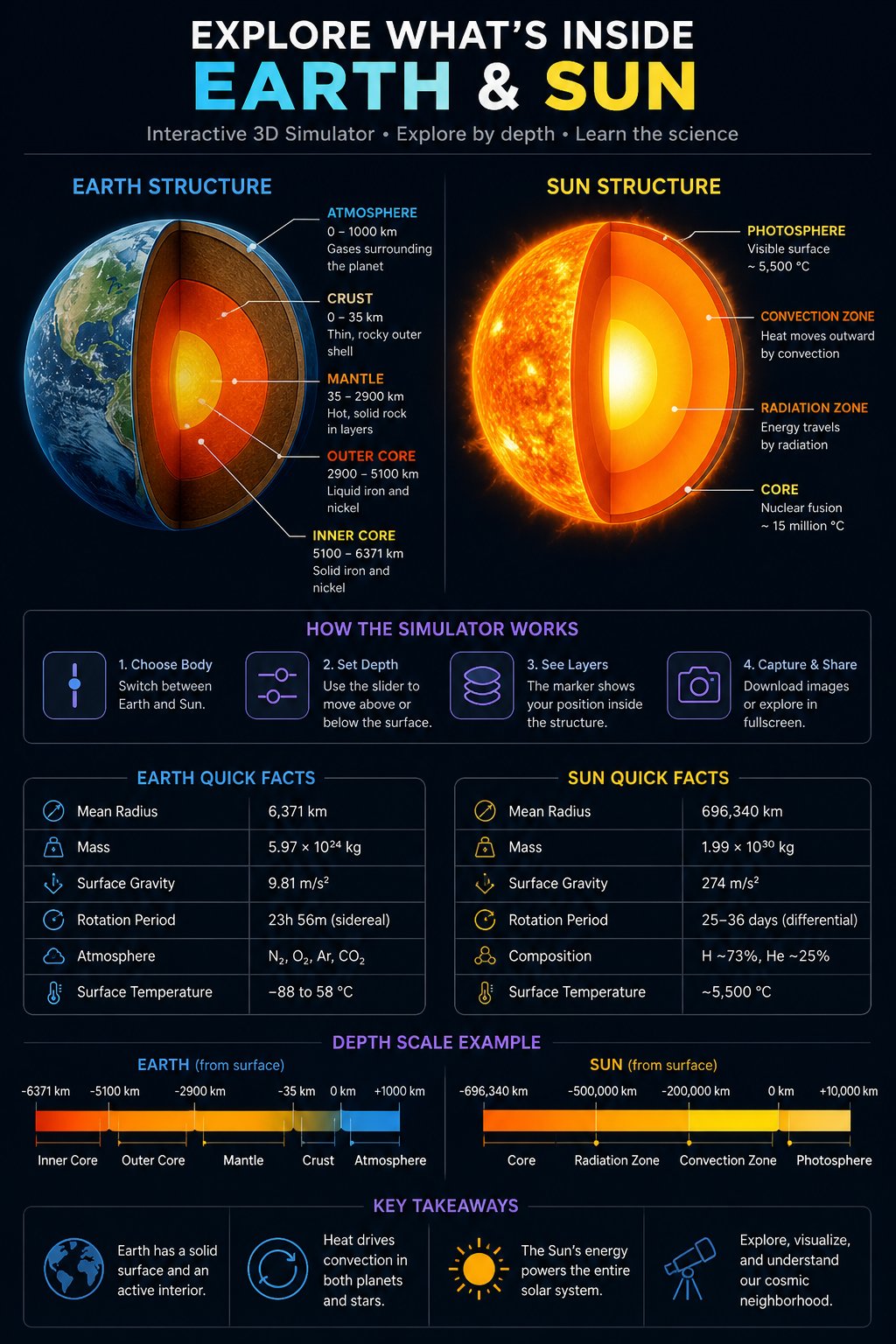
The simulator is excellent for clearing up these misconceptions because the user can move through the structure step by step. That stepwise exposure is much more memorable than a single static diagram.
Quick reading guide for users
- Use the object switch to compare Earth and Sun without changing the general interface.
- Move the depth slider slowly, because some transitions happen over short ranges and are easy to miss.
- Watch the layer label, because it tells the current physical zone rather than only the numeric depth.
- Use fullscreen when presenting, since the larger canvas improves spatial perception.
- Compare scale mentally, because the same slider movement represents very different real-world distances.
Why this kind of visualization works so well
Human memory is strongly visual when the image is linked to a process. A layered body is a perfect example. The brain remembers boundaries better when they are connected to motion and change. That is why an interactive Earth and Sun structure simulator is more effective than a paragraph of labels alone. It is also why scientific media, museums, and educational platforms increasingly use interactive graphics. The user does not just read the concept. The user experiences the concept as a sequence.
There is also a practical communication advantage. Scientific writing often becomes crowded with numbers, units, and technical names. A simulator cuts through that clutter by making one relationship visible at a time. Depth becomes position. Position becomes layer. Layer becomes meaning. That chain is what makes the tool useful.
Summary of the scientific value
The real strength of an interactive Earth and Sun structure simulator is that it combines accuracy, scale, and intuition. It gives a direct view of planetary and stellar layering, it supports real scientific language, and it helps users understand why the inside of a body matters as much as the outside. That is important for astronomy, geology, space engineering, and educational publishing alike.
When used well, the simulator becomes more than a visual toy. It becomes a compact teaching instrument for one of the most important ideas in space science: large bodies are not uniform. They are structured systems, and those internal structures control how they behave.
Useful books on Earth and Sun structure
| Book | Author | Why it is useful |
|---|---|---|
| Introduction to Geophysics | Shikhar C. Sarkar | A clear entry point into Earth structure, seismic layering, and interior physics |
| Geodynamics | Donald L. Turcotte and Gerald Schubert | Strong coverage of mantle flow, tectonics, and planetary interior dynamics |
| Principles of Planetary Climate | Raymond T. Pierrehumbert | Helpful for understanding how planetary structure connects to atmosphere and energy balance |
| The Sun as a Star | Roger J. Tayler | Classic explanation of solar structure and stellar interior behavior |
| Physics of the Sun | Stix | Detailed but valuable for radiative transfer, convection, and solar core processes |
| An Introduction to Modern Astrophysics | Carroll and Ostlie | Broad and practical background for anyone studying stellar structure and astrophysical models |
| Solar Interior and Atmosphere | Stix and other contributors | Good reference for linking visible solar layers to deep internal physics |
| Planetary Interiors | W. B. Hubbard | Useful for comparing Earth with other planets and understanding interior differentiation |
These books are especially useful when the simulator is used as an educational companion. The visual model gives the shape, while the books give the deeper explanation. Together they create a much stronger learning path than either resource alone.

Julian D. Thorne — Celestial Mechanics Developer
Researcher and 3D engine developer focused on interactive stellar systems. Julian bridges the gap between theoretical physics and real-time browser-based cosmos exploration.


